 Moorfox
The activity log and audit trail
Activity in the sidebar is the organisation's audit trail: what changed, who changed it, on which machine, and how they were connected when they did it.
It is append-only. There are no edit or delete controls, and not because they are hidden from you: the API does not offer them to anyone, admins included. A trail somebody could tidy up would not be worth reading.
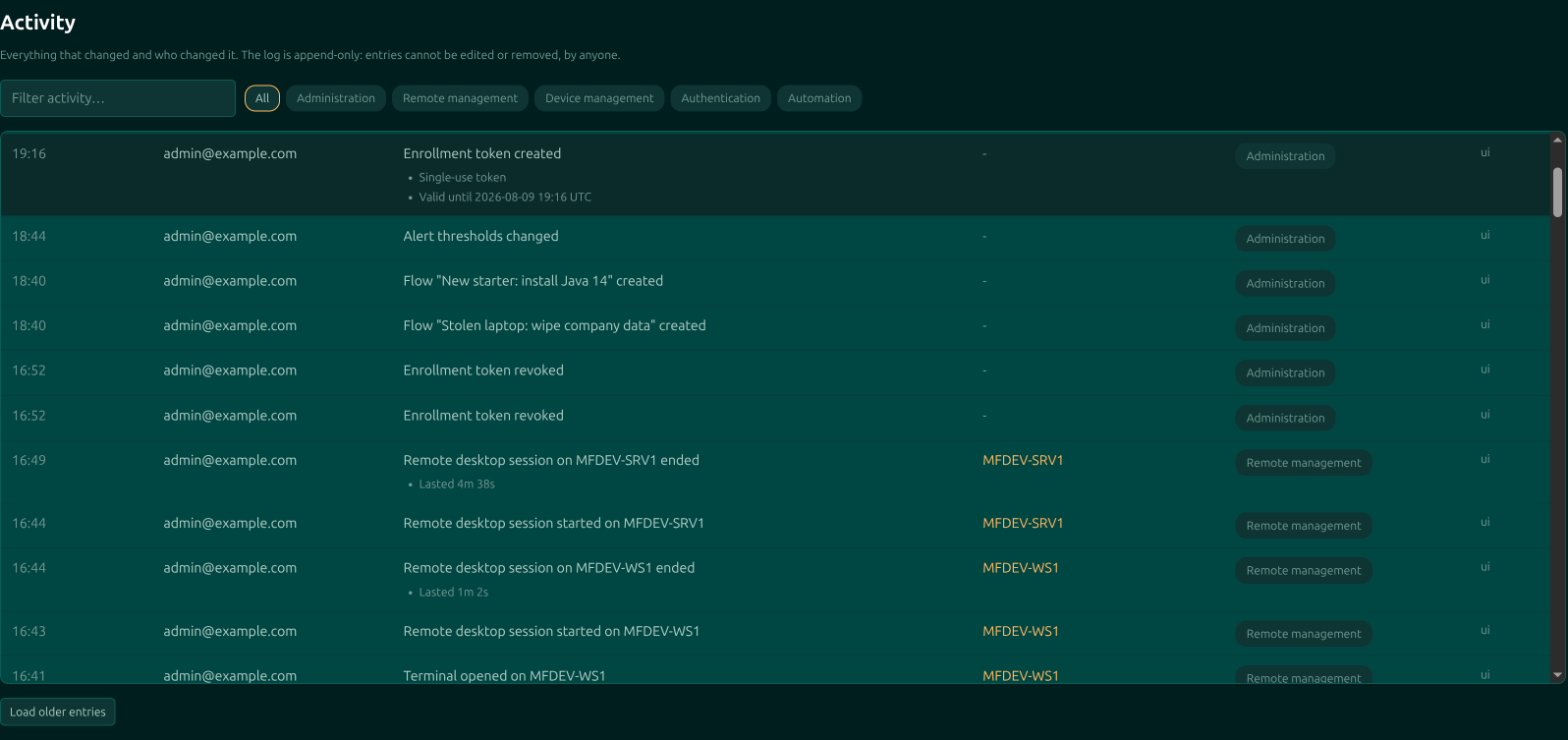
What each column tells you
| Column | What it holds |
|---|---|
| When | Today's entries as a time, older ones with the date, because a trail is mostly read as \u201cwhat happened on Tuesday\u201d. The exact timestamp is in the tooltip. |
| User | Who did it. Entries the agent raised on its own say agent. |
| Activity | What happened, with the specifics listed underneath where there are any. |
| Device | The machine it happened to, linked. A device that has since been forgotten shows its raw ID instead: the log outlives the devices it mentions, and an entry losing its subject would be worse than an unlinked identifier. |
| Category | Which of the five kinds of activity this is. |
| Via | How the action reached us, which is how a dashboard click is told apart from an API call. |
The five categories
| Category | What lands in it |
|---|---|
| Administration | Changes to the organisation itself: users, roles, settings, groups, tags, alert rules. |
| Remote management | Getting onto machines: remote desktop sessions, terminal, file transfers, process and service actions. |
| Device management | Changes to devices: enrolment, renaming, grouping, tagging, archiving, agent updates and rollbacks. |
| Authentication | Sign-ins, sign-outs, and invitations being redeemed. |
| Automation | Saved commands and flows running, and what they did. See automation. |
Reading it
The badges above the table narrow it to one category, which is usually the fastest route to an answer: Authentication for "who signed in", Remote management for "who was on that machine", Administration for "who changed that setting".
The search box filters what is loaded across summaries, user, device and the detail lines together, so a hostname, an address or a fragment of a command all find their entries.
The log loads a hundred entries at a time, with Load older entries at the bottom for the rest.
The search box filters the entries already loaded, not the whole history. If you are hunting something old, page back with Load older entries first, or narrow by category and then search.
What it is good for
Three questions, mostly. Who touched this machine? Filter to Remote management and read the device column. Why did this setting change? Filter to Administration and find the entry, which names the user. Did that automation actually run? Filter to Automation.
It is also the answer to the audit question a customer or an insurer eventually asks, which is not "do you have logs" but "can anyone edit them". Here, no.
Moorfox is remote monitoring and management without the enterprise tax.
One agent, one dashboard, remote desktop and a real terminal on every machine you look after.