 Moorfox
The security score, and managing Defender
Every enrolled machine gets a security score out of 100, built from fourteen weighted factors covering encryption, anti-malware, patching, account hygiene and network exposure. The dashboard shows the number, the risk band, and exactly which checks produced it.
The scoring is done in the control plane, not on the agent. The agent reports facts; Moorfox grades them. That means the weighting can change without upgrading a single agent, and the breakdown behind any score can be re-derived from stored inventory.
Where you see it
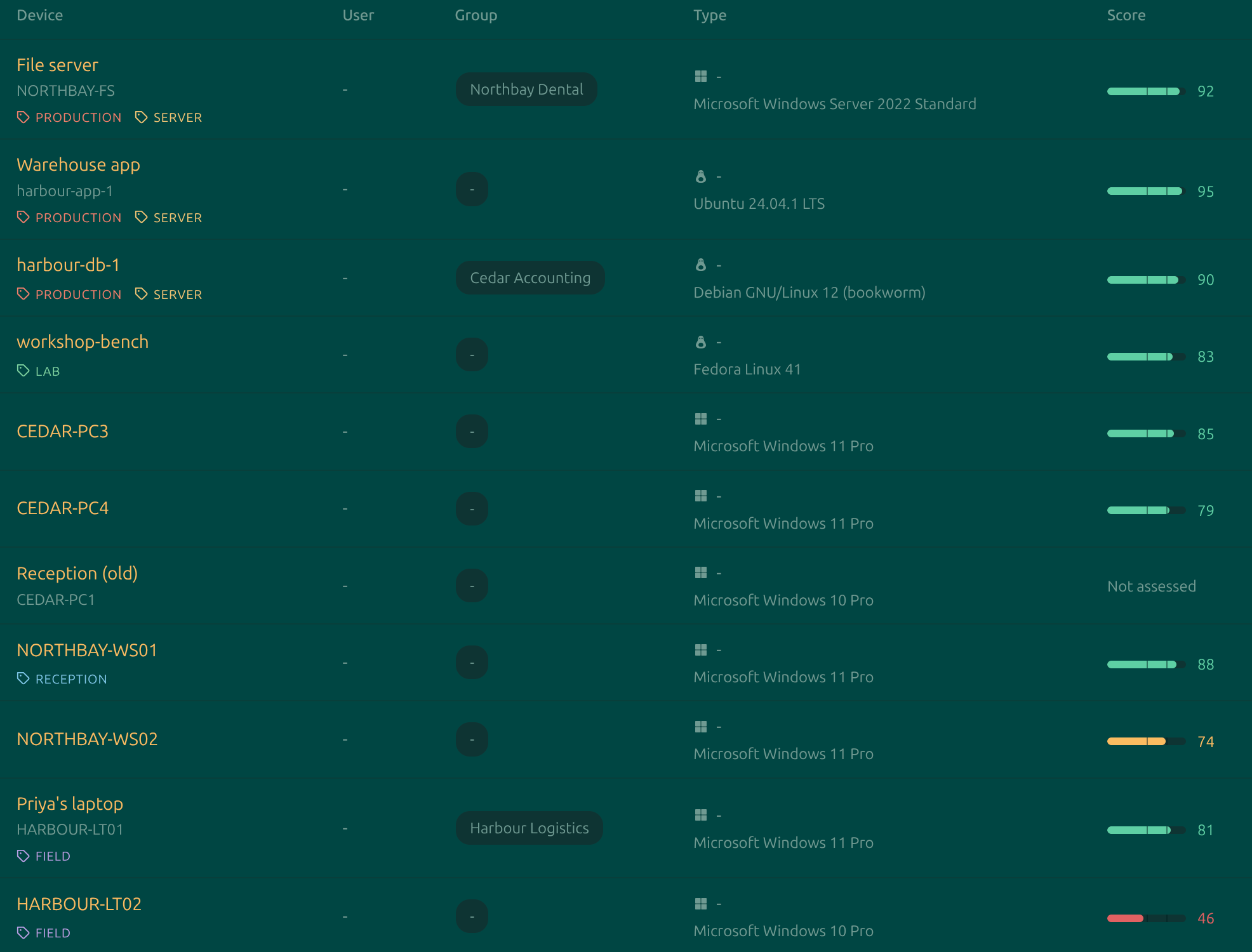
As a bar in the Score column of the device list, which is there to be scanned down a fleet, and in full on each device's Overview tab.
What gets checked
Fourteen factors. The weights sum to 100, so a machine on which everything is gradable is scored out of a full 100 points.
| Factor | Weight | Why it counts |
|---|---|---|
| Disk encryption | 12 | An unencrypted disk gives up all its data to anyone who removes it from the machine. |
| Antivirus | 12 | A machine with no active real-time anti-malware has nothing stopping a known threat that reaches it. |
| Firewall | 12 | Without a host firewall, every listening service on the machine is reachable by anything that can route to it. |
| Known vulnerabilities | 10 | Published CVEs in the software the machine runs, matched against the vendors' own security trackers. Fails on any CVE known to be exploited in the wild, or a critical one with a fix available; warns on a high one. Unknown, not failed, until the machine has been matched. |
| Endpoint detection (EDR) | 8 | EDR catches behaviour that signature antivirus does not, and is what makes an incident reconstructable afterwards. Moorfox sells one: see Bitdefender EDR. |
| OS support status | 8 | An OS past end of life stops receiving security fixes entirely, so its patch level ceases to mean anything. |
| Antivirus signatures | 6 | Out-of-date signatures leave an otherwise working scanner blind to recent threats. |
| Patch compliance | 6 | Unapplied security updates are the most commonly exploited weakness on a managed machine. It is also the factor you can hand to a schedule: see patching. With known vulnerabilities and automatic updates it makes up patching's 20 points: the pending count measures the habit, the CVEs measure the outcome. |
| User account control | 5 | Without it, any process a user runs already holds full administrative rights. |
| Administrator accounts | 5 | Every additional administrator is another account whose compromise means total compromise. |
| Network exposure | 5 | A machine holding a public address directly is reachable from the internet without anything in front of it. |
| Automatic updates | 4 | A machine that does not patch itself only stays current for as long as someone remembers to do it. |
| Secure Boot | 4 | Secure Boot is what stops a bootkit surviving reinstallation of the operating system. |
| Guest account | 3 | An enabled guest account is an unauthenticated foothold on the machine. |
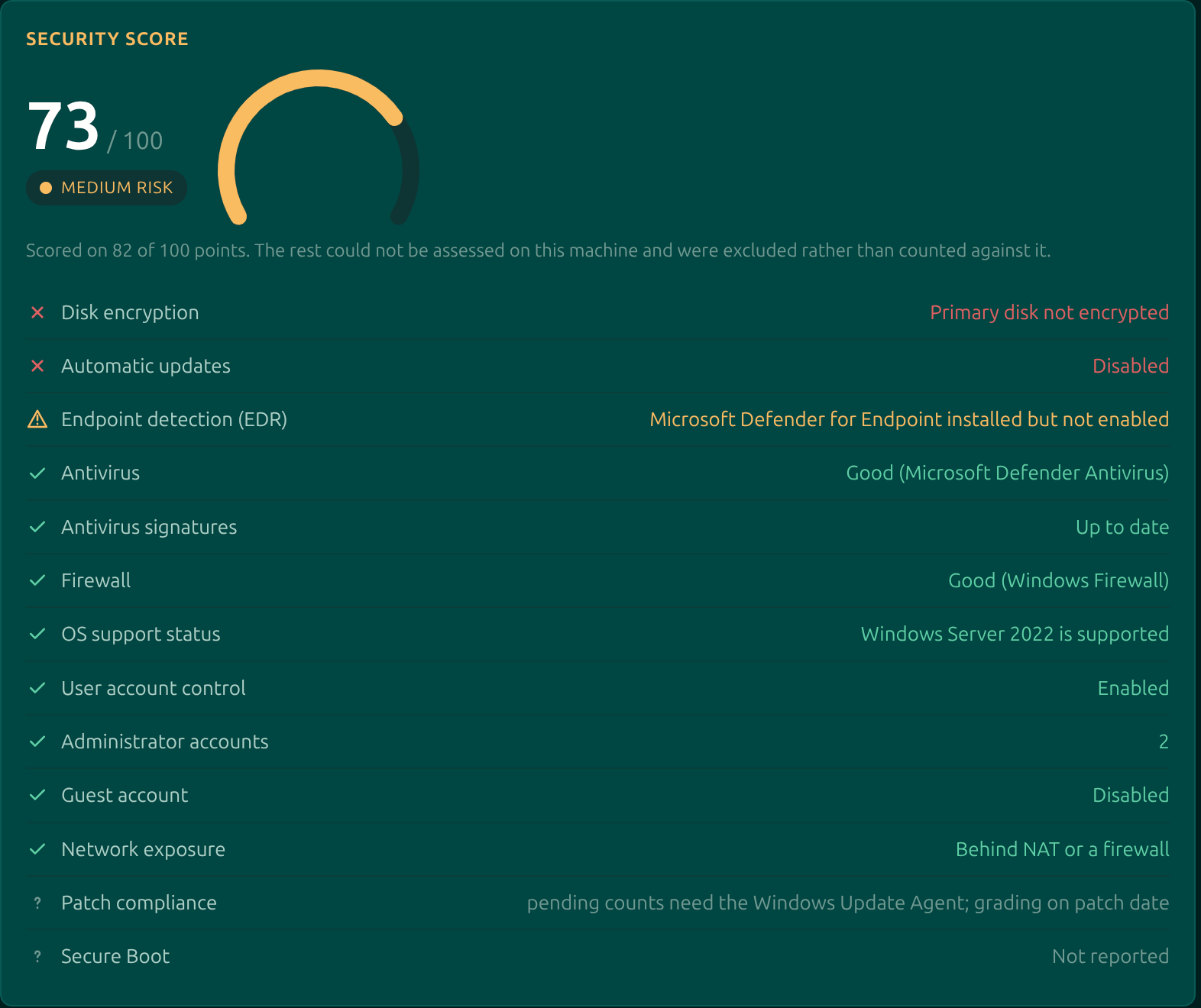
Each factor shows what the machine actually reported next to it, so the row reads as evidence rather than a verdict: not "firewall: fail" but Good (Windows Firewall), or 3 security updates pending. Hovering the label explains why that factor matters at all.
The four statuses
| Status | Scores | Means |
|---|---|---|
| Tick | Full weight | The check passed. |
| Warning | About half its weight | Partly satisfied. Defender for Endpoint installed but not enabled is the classic one: the machine is better off than without it, and not where it should be. |
| Cross | Nothing | The check failed. |
| Question mark | Excluded entirely | The machine could not answer. This is the important one, below. |
Unknowns are excluded, not failed
This is the central design decision and worth understanding, because it is what makes the number trustworthy across a mixed estate.
A factor the agent could not determine is taken out of the denominator rather than scored as a failure. A Linux box has no UAC and no BitLocker; grading those as zero would make every Linux machine look negligent beside a Windows one, and you would rightly stop believing the column.
The cost of that choice is honest and stated: a machine reporting very little can score high on very little evidence. So whenever the model did not fully apply, the card says scored on N of 100 points. A 100 out of 32 applicable points is a much weaker claim than 100 out of 95, and hiding the difference would make the number look more authoritative than it is.
A machine that has never reported a security inventory shows Not assessed, never a zero. A machine nobody has examined and a machine examined and found wanting are completely different situations, and an operator triaging an estate must not see the same number for both.
Risk bands
| Band | Score |
|---|---|
| Low | 75 and above |
| Medium | 50 to 74 |
| High | 25 to 49 |
| Critical | Under 25 |
These are deliberately spaced to what real machines earn rather than to round numbers. A fully managed, healthy Windows box lands in the seventies, not the nineties, because a handful of factors are near-impossible to satisfy outside a hardened build. Bands reserving "low" for 90 and above put an entire healthy estate into the two worst buckets and gave nothing to sort by.
So do not chase 100. Chase the crosses.
Microsoft Defender
On a Windows device that is online, the Overview tab carries a Microsoft Defender card beside the score. Where the score grades Defender, this card drives it.
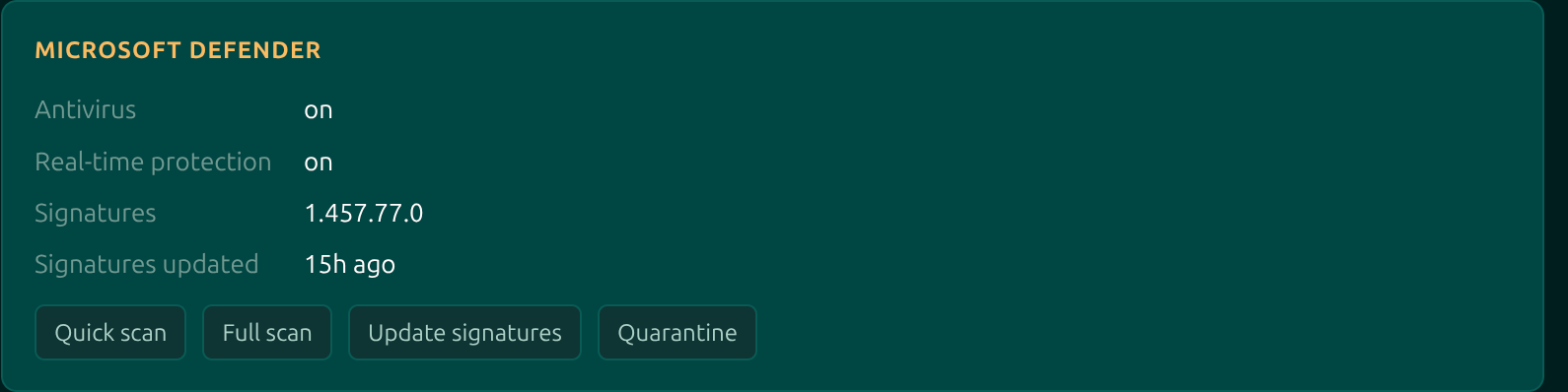
The state here is read from the machine's registry at the moment you open it, which makes it fresher than the hourly inventory behind the score. That matters when you have just fixed something and want to see it land.
| Control | What it does |
|---|---|
| Antivirus and Real-time protection | Whether each is on. Either can be switched off locally or by policy, and the card reads both places. |
| Signatures | The definition version, and how long ago it was applied. An old date here is what the score's antivirus-signatures factor is reacting to. |
| Quick scan | Starts a quick scan and returns immediately. Progress is Defender's own to report; the scan is not held open by the dashboard. |
| Full scan | The same, for a full scan. These run for a long time, so nothing waits on them. |
| Update signatures | Pulls definitions now instead of waiting for the schedule. The card re-reads the state afterwards rather than assuming it worked. |
| Quarantine | Lists what Defender has quarantined on this machine. |
This needs no Microsoft licensing. Defender Antivirus ships with every Windows machine, and Moorfox drives it through MpCmdRun.exe and the registry, both documented management planes. It is antivirus management, not Defender for Endpoint, which is a separate paid product.
The card says plainly when it has nothing to show: not applicable on this platform for a non-Windows machine, Microsoft Defender is not installed where it has been removed or replaced, and a note that live state needs the device online.
Turning a score into work
The device list's Filters row has a risk column, so "show me every critical machine" is one selection. From there the factor breakdown on each device names the specific thing to fix, and the terminal and Defender card are how you fix most of them without leaving the page.
Scores are recomputed from inventory, so a fix shows up once the machine reports again. Refresh inventory in the Actions menu asks for that now rather than at the next scheduled collection.
Moorfox is remote monitoring and management without the enterprise tax.
One agent, one dashboard, remote desktop and a real terminal on every machine you look after.