 Moorfox
Patch management in Moorfox
Two halves. Every agent scans its machine for pending updates and reports them, so the fleet view is honest without anyone configuring anything. A policy then turns that list into installs: a weekly window, what to install, and how long an update must have been out before it is allowed on your machines.
The wait is the important part. Moorfox counts it from the day each machine first saw the update pending, not from a vendor's release date, so a bad patch that gets pulled in its first week never reaches a fleet running a seven day deferral.
Reading the patch state is open to any user; policies, overrides and installs are admin only.
What gets scanned
| Platform | Source | What you get |
|---|---|---|
| Windows | The Windows Update Agent | The same updates Windows Update itself would offer, with their KB number, categories and severity. Machines pointed at WSUS are detected and badged rather than argued with: Moorfox reports what is pending, and your WSUS keeps deciding what is approved. |
| Windows, third-party | winget | Upgradable desktop applications, listed alongside the OS updates and marked Third-party (winget). Best effort: winget knows about the applications it knows about, and an app installed outside a package it recognises will not appear. |
| Linux | apt or dnf | Pending packages from the distribution's own repositories, security ones marked as such where the distribution says so. |
| macOS | Nothing | There is no macOS agent yet, so there is no macOS patching. It is the honest gap and it is on the list. |
Scanning happens on its own schedule and on demand, and needs no configuration: a machine enrolled this morning is in the fleet numbers this afternoon. Agents older than the release that introduced patching report nothing and show as never scanned until they update.
Seeing what is pending
Patches in the sidebar is the fleet view: one row per machine with what it is waiting on, the known vulnerabilities (CVEs) that leaves it open to, how long the oldest update has been waiting, and when it last managed a scan. Its CVEs tab turns the question round: search for a CVE and see which machines are open to it.

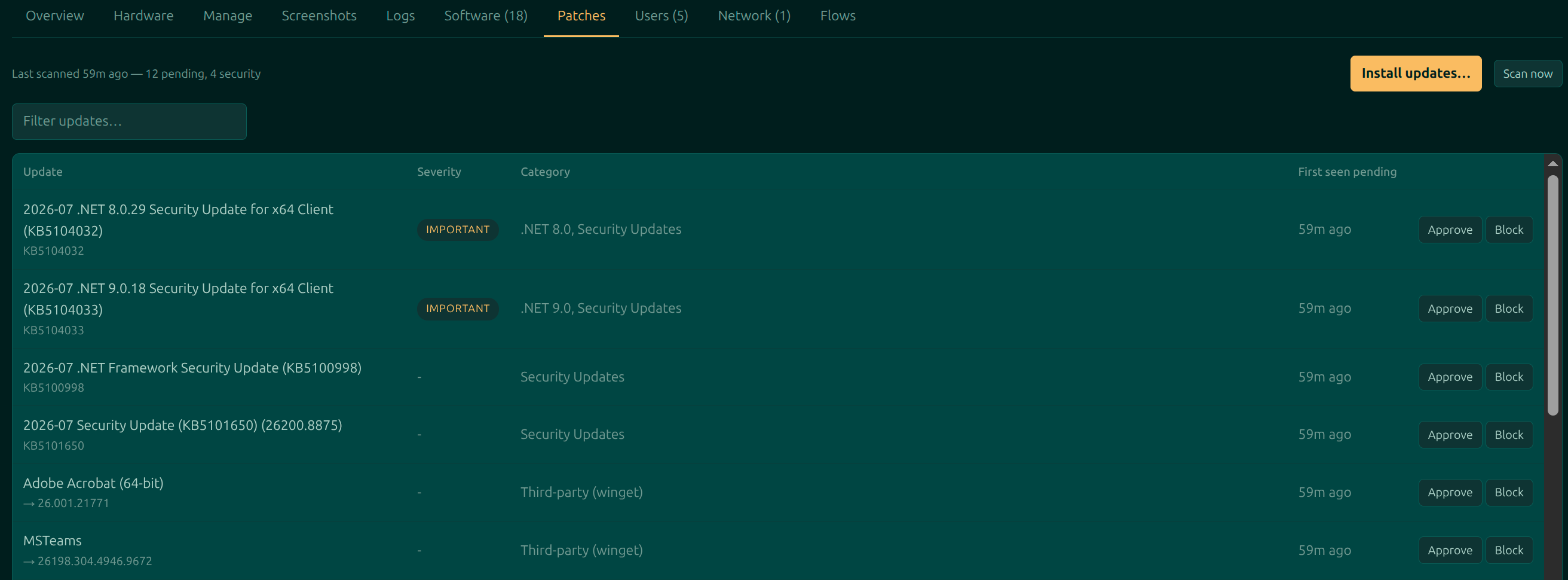
A device's own Patches tab is the detail: every pending update with its severity and category, when this machine first saw it, and per-update approve and block buttons.
Installing now
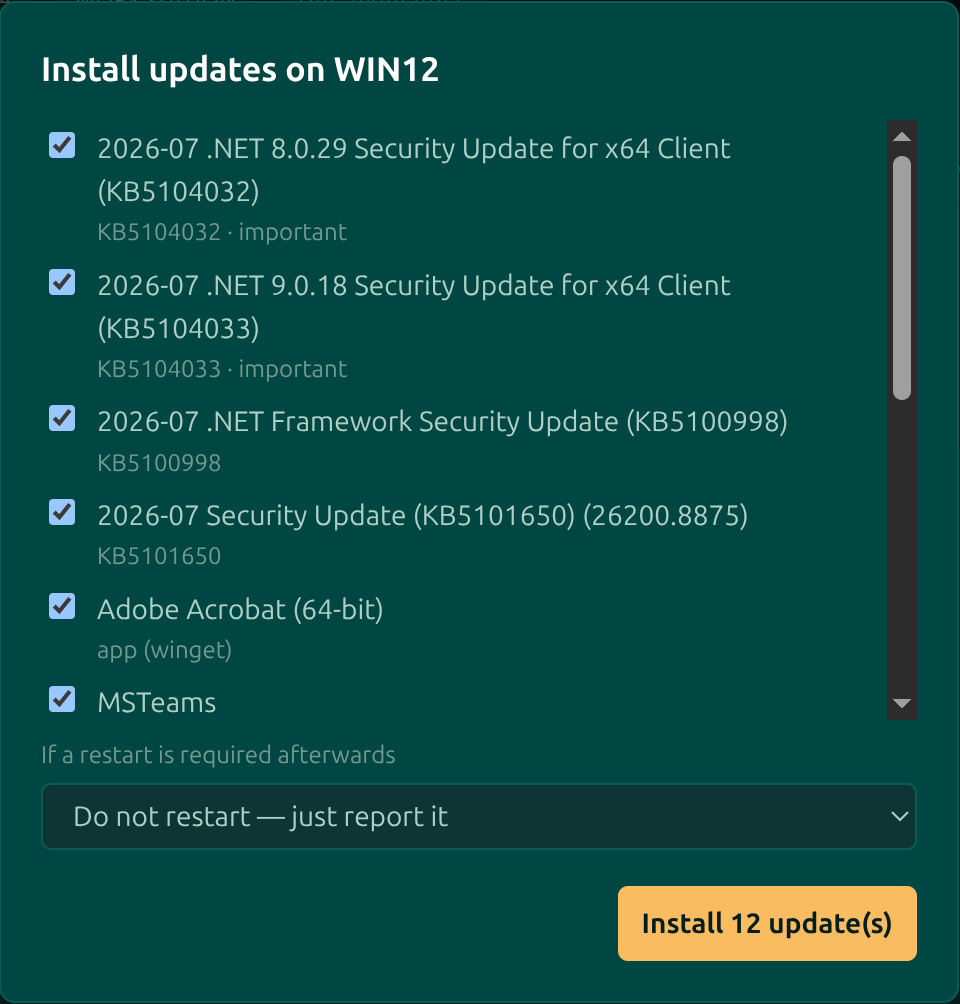
Install updates asks for the list and what to do about a restart, then hands the job to the agent. Everything unblocked is ticked to start with; untick what you do not want.
Two things worth knowing about a manual install:
- It outlives the connection. Closing the tab, losing the network or restarting the machine does not lose the result: the agent holds on to it and reports it when it next gets through.
- It ignores your block list, deliberately. An operator naming a specific update outranks a rule written for the general case; if you did not mean to install it, untick it.
A machine that is offline still takes the job. It runs when the machine next checks in, within the next day, and is dropped after that rather than turning up as a surprise a fortnight later.
Policies
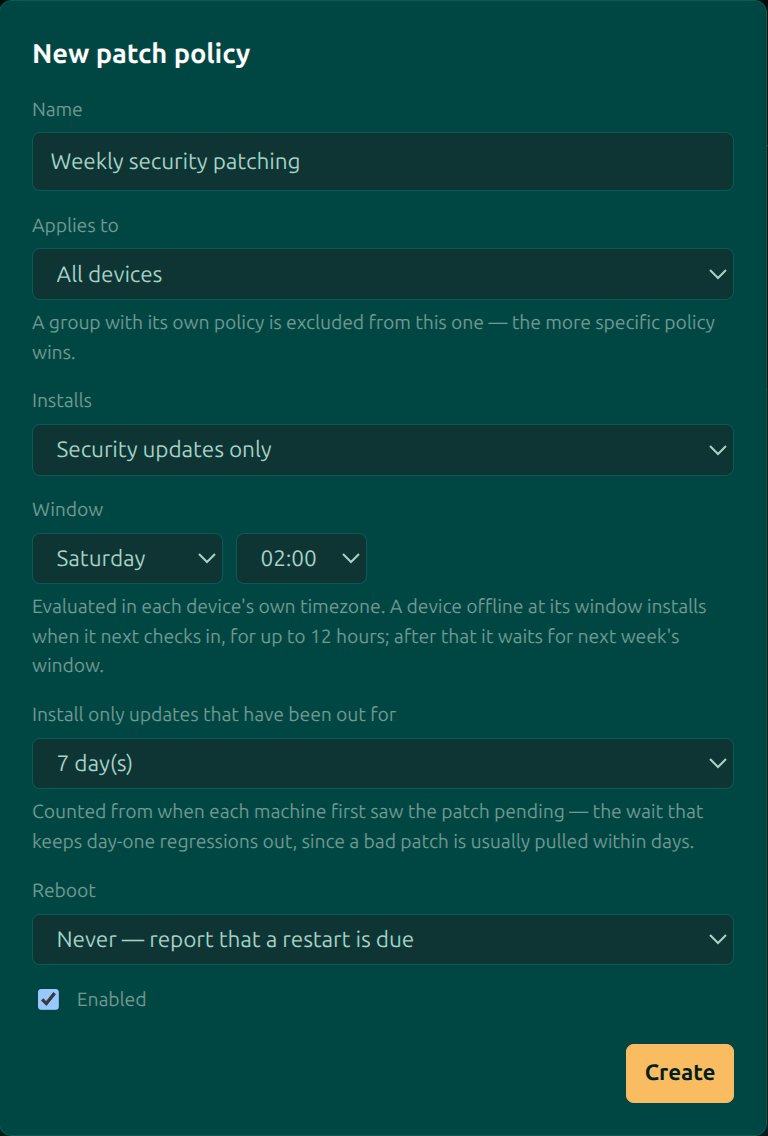
A policy is what makes patching happen without anyone watching. New policy on the Policies tab of the Patches page.
| Field | What it does |
|---|---|
| Applies to | All devices, or one group. The most specific policy wins: a group with its own policy is carved out of the all-devices one rather than being patched twice. |
| Installs | Security updates only, or everything pending. Security only is the setting most fleets should start on. |
| Window | A day and an hour, evaluated in each device's own timezone, so 02:00 Saturday is the small hours everywhere rather than the middle of somebody's Friday afternoon. A machine that is off at its window installs when it next checks in, for up to twelve hours; after that it waits for next week. |
| Install only updates that have been out for | The deferral, in days, counted from when each machine first saw the update pending. This is the setting that keeps release-day regressions off your fleet: a bad update is usually pulled within days, and a fleet on a seven day wait never sees it. |
| Reboot | Whether the machine may restart itself when an update needs it, or should simply report that a restart is due. |
| Enabled | Off is a real answer. A disabled policy keeps its settings and stops installing. |
A weekly window and a deferral compound. A seven day wait on a Saturday window means an update that appears on a Sunday waits its seven days, misses that Saturday by hours, and goes on the Saturday after: thirteen days in the worst case. That is the arithmetic working, not a fault, but it is worth knowing before you set a fourteen day deferral on a monthly window.
Approving and blocking
The Approve and Block buttons on the Overrides tab of the Patches page set an override for the whole organisation, not one machine, because a bad update is bad everywhere. The tab lists every update pending anywhere in the fleet with the number of machines waiting on it.
| Override | Effect |
|---|---|
| Block | No policy will install this update on any machine. The one exception is an operator explicitly ticking it in the Install updates dialog. |
| Approve | Skip the waiting period for this update. This is the lever for the out-of-band fix that you want on the fleet tonight rather than next Saturday. |
Restarts
When a policy or an operator has allowed it, the machine uses the operating system's own restart countdown, five minutes with the usual warning, so whoever is sat at it gets the notice they would get from any other update. Moorfox does not draw a nag of its own on top.
Where a restart is needed and not allowed, the machine is badged as waiting for one and stays that way until somebody deals with it. The agent also refuses to update itself while an install is running, and refuses to start an install while it is updating itself: swapping the binary halfway through installing an update is how a machine earns a site visit.
What it does not do
- No macOS. No agent, no patching.
- No test ring. The deferral is the safety mechanism, not a pilot group you promote from. Point a policy at a small group with a short wait and the rest of the fleet at a longer one, and you have most of the benefit.
- No snooze for the person at the machine. The restart warning is the operating system's, and it counts down.
Moorfox is remote monitoring and management without the enterprise tax.
One agent, one dashboard, remote desktop and a real terminal on every machine you look after.